Draft Punk 101: Your Complete Guide to an AI-Powered Draft Day Edge
What the app does, why its data beats the competition, and how to squeeze every advantage from its AI features.

Draft Punk Team


Draft Punk is an AI-powered fantasy football draft companion app. First, it helps you prepare for draft day with player cheatsheets, info, rankings, research, and full simulated mock drafts.
But it's main value is helping you draft an optimal team during your actual draft. As a companion app, you will need to re-create your league settings in this app and manually keep track of who's been drafted. By doing this, you'll be able to take advantage of the superior data, player insights, and custom recommendations Draft Punk provides.
How to outdraft your competition
Quite simply, more accurate projections is the main difference maker to drafting a better team. Accurate projections allow you to generate custom rankings using your unique league settings (ie projections * your settings = projected points). Most of your competition will use a ranking list generated by Yahoo, ESPN, etc. But all of those rankings assume some default scoring settings (PPR vs non-PPR, 3 WR, etc). Plus, these rankings may be stale. By generating rankings for your unique league, you will immediately have a huge edge.
So the key is using accurate projections. While many large companies outsource their projections to a 3rd party, Draft Punk uses advanced data science techniques to generate projections (collective predictive analytics). As a result, they have consistently outperformed projections of the major players for the last 10 years.
Projection Accuracy by Year
How to use it to keep your draft in sync
To get started, click "New Draft" and enter your league's scoring settings and draft settings. Make sure to choose which team you will be drafting for. This will allow the app to auto-assign teams and will be able to provide accurate recommendations and real-time insights.
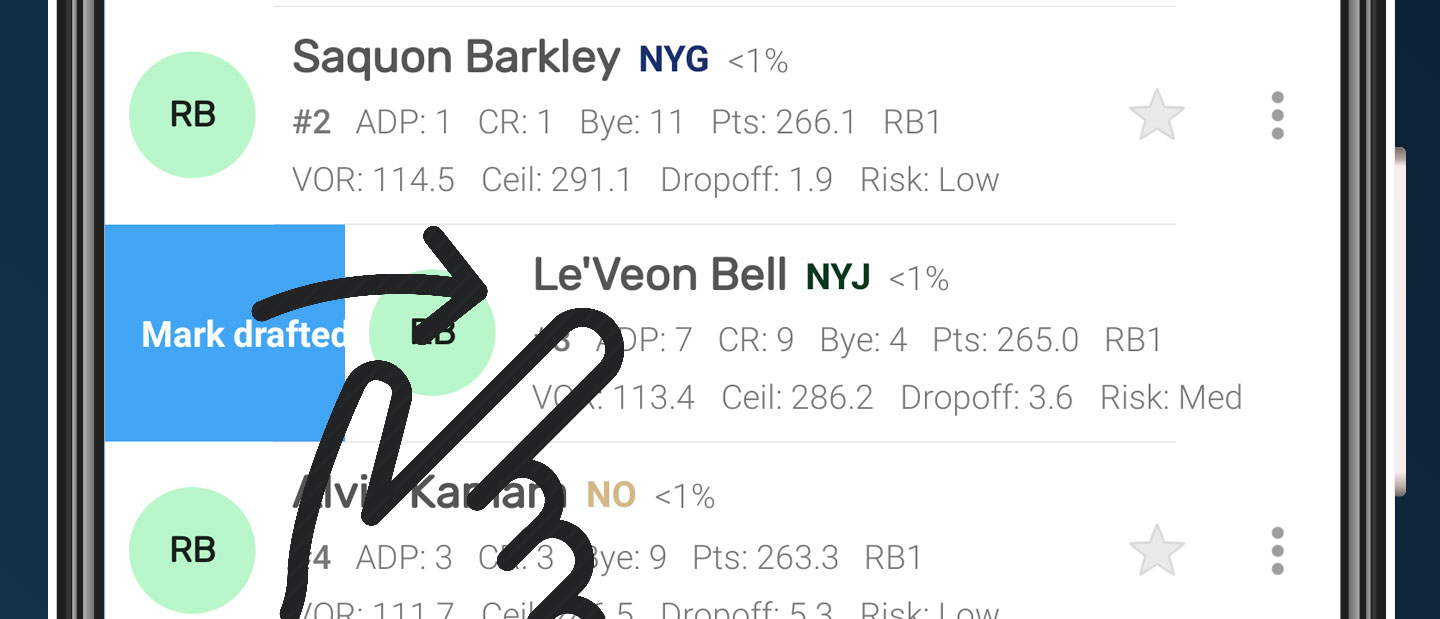
Once in the draft screen, you will need to manually keep Draft Punk in sync while your real draft is in progress. Select each player as they are drafted, and you will see the "Team" and "Results" views fill out. If you make a mistake, go to Results to undo the pick or use that player's menu to change the team assignment. On Android, you can also swipe right on a player as a shortcut to marking them drafted.
Understanding the draft experience
Draft Punk has 4 views: best available players ("List" or "Players"), results by team ("Team"), results over all ("Results"), and a place to store interested players ("Interested").
The best available players are sorted and filtered as you choose. By default, the sorted order is the custom auto-generated rankings based on superior projections and your custom league settings. You can choose to sort by other ways like ADP or consensus rankings. You can also create your own custom rankings and sort by that.
Each player row contains a ton of info. Reference this player row example from the Android app to understand more:
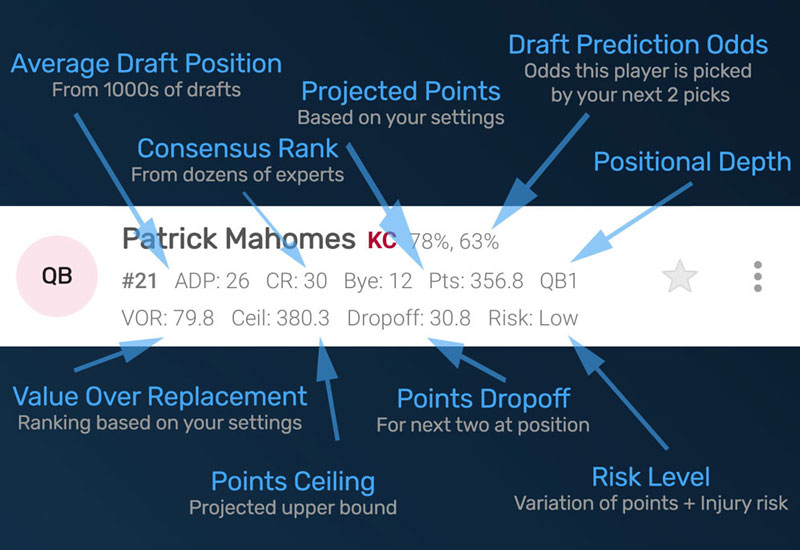
You can show or hide some of this data and any custom Notes you may have added for your players.
Finally, some of the data are for PRO users. This includes ADP, Points Ceiling, Risk, Dropoff, Depth, and Odds.
When it's your turn
When the app has detected it's your turn, a few additional insights are generated.
Points DropoffPRO
This is the amount of points of the next two players at this position. It's a good way to know if you
need to draft that person now or if you could wait.
Predition OddsPRO
These percentages show next to the name. You may see just 1 or 2 percentages. They are the predicted
percent that the player will be drafted by your next pick, or even your next next pick.
The app will simulate the next two rounds hundreds of times to determine this. So if your competition all
have drafted a starting QB already, they are less likely to draft another one. If the percent is small, it's
more likely they will be gone
soon and you should draft them now. If the percent is high, maybe you can wait one more round. (You can also
sort by odds at this point as well)
Bye Week Conflicts
Bye weeks turn red if you have someone at same position with the same bye.
Team Needs
Draft Punk gives you a sense of your team needs.
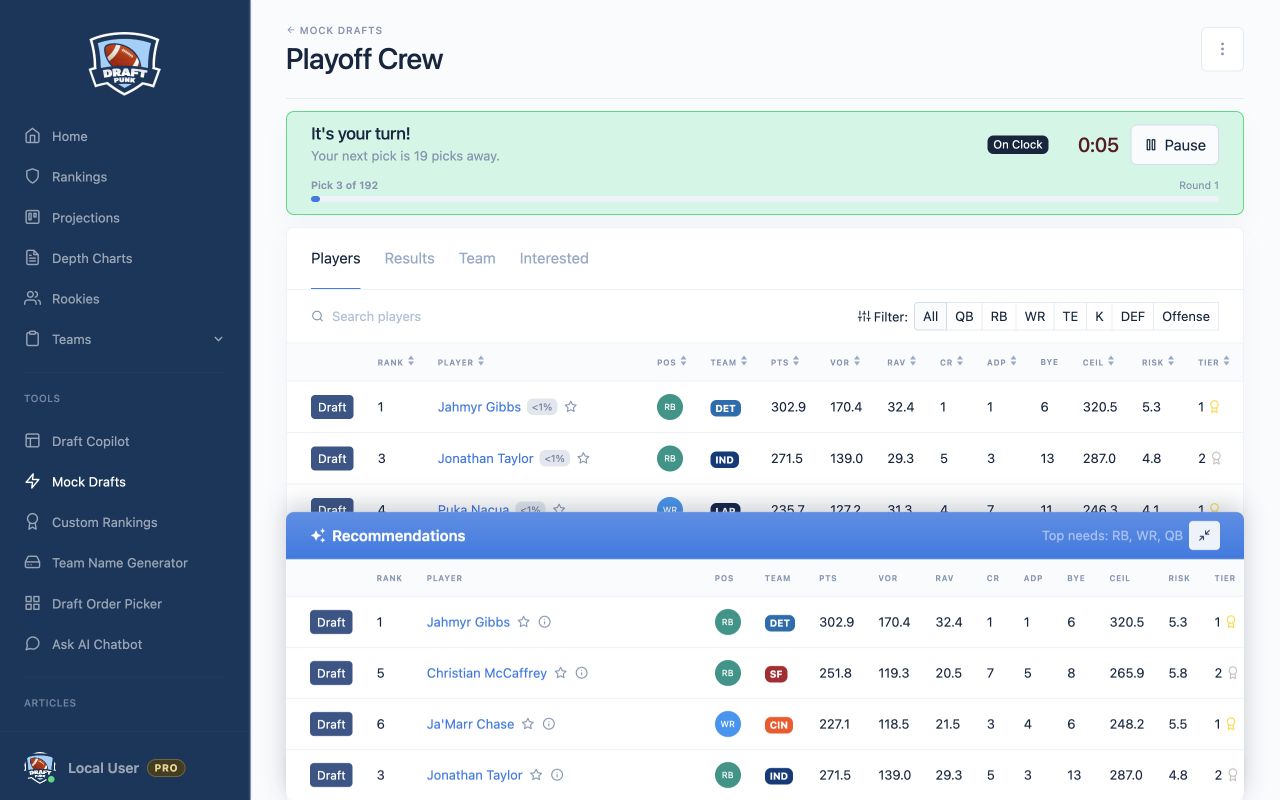
Custom RecommendationsPRO
Open the recommendations to see up to 5 players. The current recommendation engine is
documented in detail below, but in short looks at team needs, positional scarcity, and tries to include more
optimal players.
How AI and Machine Learning contribute to this app
Player projections
Uses a collective prediction analytics technique to generate more accurate projections. This technique
determines point estimates of single continuous quantities. It attempts to eliminate the noise associated
with individual
judgment to arrive at more accurate predictions.
Player tiersPRO
Uses K-means clustering to group similarly projected players within each position. A useful technique to know
if you can wait on a player since similarly performing players are available.
Player recommendationsPRO
Current engine uses monte carlo simulations and multiple objective optimization. The engine will also
look at different attributes at different times in the draft. For instance may
look to optimize player points while minimizing risk in the earlier rounds (and for starters). But in the
later rounds, may try to maximize player point ceiling with allowing for more player risk.
Pick Recommendation Engine Details
When it's your turn, Draft Punk shows you player recommendations to help you draft an optimal lineup.
The current recommendation engine considers:- Team Positional Needs
- League Position Scarcity
- Prefers to suggest starters before bench players
- Prefers low risk players at beginning of draft and then riskier players later
- Tries to avoid by week conflicts and find a similar positional player without a conflict
The engine uses monte carlo simulations and multiple objective optimization. The engine will also look at different attributes at different times in the draft. For instance may look to optimize player points while minimizing risk in the earlier rounds (and for starters). But in the later rounds, may try to maximize player point ceiling with allowing for more player risk.
The recommendation engine is still in development and will get more accurate over time
Expected Points by Position
If you analyze the past 15 years of fantasy football data, a number of trends appear in terms of points per position. For instance:
- QBs, RBs, WRs, and TEs have more accurate point predictions. Ks and DEFs have much less accurate preditions. So choose them as your last picks.
- RBs, WRs, and TEs have a large dropoff of points. So the first picks are much more valuable.
- QBs have a more uniform dropoff. So you can possibly choose a QB throughout the draft
Try the experience with a mock draft
The best way to get comfortable with Draft Punk before draft day is to run a mock draft. Create one with the same scoring, roster, team count, draft order, and draft position as your real league. Draft Punk will simulate the other teams and pause when it's your turn to pick, so you can practice using the same rankings, team needs, player insights, and recommendations you'll have during the real draft.
Mock drafts require a Pro upgrade PRO. But you can demo mock drafts for free here.
A mock draft gives you a low-pressure way to:
- Learn where to find players, filters, team results, and recommendations before you're on the clock.
- Experiment with different roster builds instead of committing to the first strategy you try.
- Practice using tiers, points dropoffs, ADP, and prediction odds to decide when to wait on a player.
- See how the available player pool and your team needs change from round to round.
One mock draft is only one possible outcome. Run several and try different draft positions or decisions to learn which strategies hold up when the board changes. When you are ready, start a mock draft and put the full Draft Punk experience through a practice run.
Recommended Strategies for Winning your Draft
Draft "safe" starters first
Because player predictions are hard in general and there's always unforeseen circumstances, it's important
to draft good picks that are "safer". Safer means they have a lower probability of injury and their
projected points are more uniform. This app
includes this info as "Risk" and shows Low, Medium, or High. In short, pick starters that are low risk and
high value over replacement. This app includes a unique sort option called "Risk Adjusted VOR" that attempts
to find that multi-objective
optimal ranking.
Draft "riskier" offensive players next
Generally speaking, a bench player will only help your team if your starter underperforms. So they may not
even be used. As the draft progresses, and you have your offensive starters already, consider players that
could outperform their projections. Specifically,
look for players with higher risk and higher points or ceiling points. This app includes a unique filter for
"Sleepers" that fit this combination.
Draft Ks and DEFs last
Kickers and defenses have less variation in their point projections and historically are harder to predict.
Wait until the last rounds to choose them.
Other signals to consider
Tiers, Dropoffs, ADP differences, and Prediction Odds. If there are many players in a similar tier, you can
consider skipping for a round. Similarly, points dropoff may suggest if you should draft now or later. ADP
differences may suggest what your competition
may do.
And prediction odds tends to take all of these into account, running a number of simulations for the next two rounds to give you an idea (not a guarantee!) of how likely a player is still available.
Draft Punk Team
Your AI fantasy football draft copilot
Drafting
Top Tier Data
Fantasy Tools
© 2026 Clemm Apps