Draft Punk Frequently Asked Questions

Top questions
- Where can I use Draft Punk?
- Do I need an account?
- Does Pro unlock both Web and Android?
- How do I draft players?
- Is there mock draft support?
- How are Draft Copilot recommendations determined?
- What is the percentage next to a player's name?
- Can I move a draft between Web and Android?
- How can I learn more about Draft Punk's data?
- Why use VOR instead of default rankings?
- What is ADP?
- How should I use player tiers?
- Can I assign a player or keeper to a specific team?
- Does Draft Punk support IDP leagues?
- Can I customize the rankings?
- How often is the data updated?
- Why isn't a scoring setting available?
- Why is a player missing?
- Are auction leagues supported?
- Is Draft Punk Pro yearly?
- I upgraded to Pro, but it still shows Free. What should I do?
- Who makes Draft Punk?
Where can I use Draft Punk?
Draft Punk is available on Web and Android. On Web, you can use Draft Copilot, run Mock Drafts, browse rankings and projections, and use Draft Punk's fantasy tools from a modern browser.
For the mobile draft-day experience, visit the Android page or download Draft Punk from Google Play. The two experiences share the same Draft Punk data and strategy, but their interfaces and some platform-specific features differ. See the complete Web vs. Android feature comparison.
Do I need an account?
An account is required to create and save drafts on Web. It lets you reopen those drafts from another browser by signing in with the same Google account. You do not need an account on Android because your drafts are saved directly on your phone.
Does Pro unlock both Web and Android?
Not automatically today. Web Pro is attached to your signed-in Draft Punk account and managed through Web billing. Android Pro is attached to the purchase managed by Google Play. A Pro purchase on one platform does not currently unlock Pro on the other platform.
If you purchased Pro on Web and want to use it on Android, email clemm.apps @ gmail.com with the subject Draft Punk Pro Transfer.
How do I draft players?
For both Web and Android, create a new draft with your league settings. As your actual draft happens, manually mark each selected player as drafted in Draft Punk.
Draft Punk follows your league's draft order and assigns the next team automatically. Use the player's action menu when you need to draft at another spot or mark a keeper.
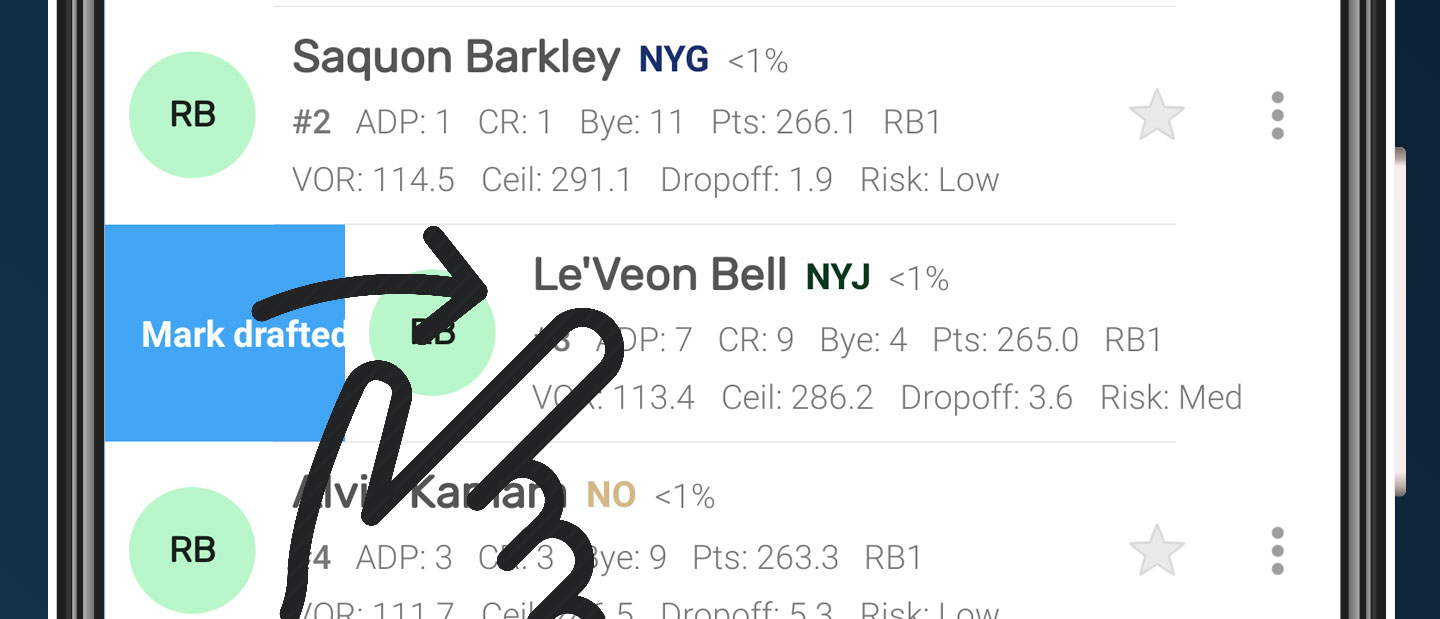
On Android, you can additionally swipe a player as a shortcut to marking them drafted.
Is there mock draft support?
Yes. Draft Punk Pro unlocks custom mock drafts, the full set of simulated opponent strategies, and saved practice runs you can reopen later. To see what mock drafts look like, you can run a guided Draft Copilot demo for free.
How are Draft Copilot recommendations determined?
When it is your turn, Draft Copilot can show up to five recommended players. The recommendation engine balances several signals:
- Your roster and remaining positional needs
- League-wide position scarcity and value over replacement
- Starter needs before bench depth
- Player value, risk, and projected ceiling
- Bye-week conflicts and the likelihood a player reaches your next pick
The strategy changes with the draft. Earlier recommendations favor reliable starter value, while later recommendations can take more risk in search of upside.
See how Draft Punk tests new recommendation strategies in The Testing Arena.
What is the percentage next to a player's name?
Pick odds estimate the chance that a player will still be available at your next pick. Draft Punk simulates the opponent picks between your current pick and your next turn. Use the percentage to decide whether you can wait or should select the player now; it is an estimate, not a guarantee.
Can I move a draft between Web and Android?
Yes. From Android's Manage Drafts screen, export a draft to another device and note the three-character code. On Web, open the Draft Copilot actions menu, choose Import Draft, and enter that code.
An import creates a new copy; it does not continuously sync changes between Web and Android. Some Android-only settings are preserved as metadata. IDP draft imports preserve IDP roster, scoring, and VOR settings and require Draft Punk Pro on Web.
How can I learn more about Draft Punk's data?
Draft Punk combines projections, rankings, ADP, VOR, player risk, tiers, dropoffs, depth-chart context, and other draft insights. The fantasy football glossary defines each signal, while the How It Works guide explains the strategy behind them.
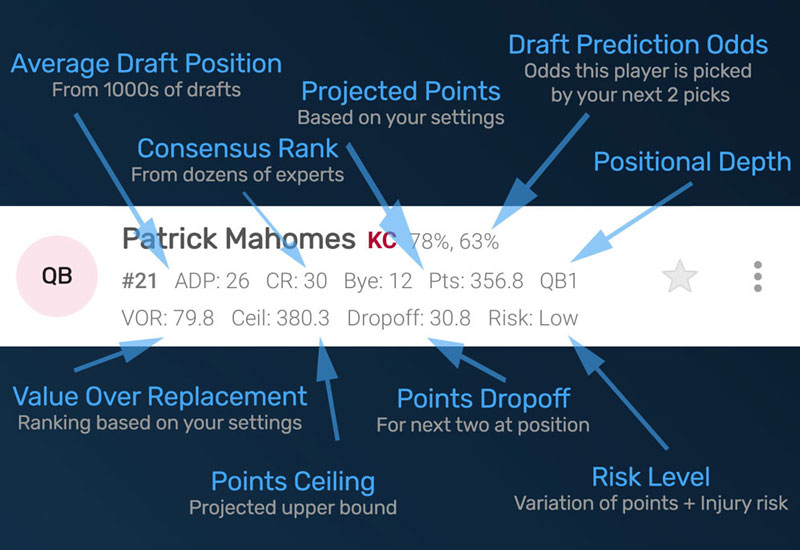
The diagram below explains the compact player row used in Draft Punk for Android. Draft Punk for Web has similar fields.
Why use VOR instead of default rankings?
Value over replacement (VOR), also called value-based drafting, compares a player with the replacement-level option at the same position. Because it uses projected points and your league's scoring settings, VOR reveals positional scarcity that a generic overall ranking can miss.
What is ADP?
ADP means average draft position: the point in drafts where a player is typically selected. Comparing ADP with Draft Punk's rankings helps identify bargains and avoid taking a player much earlier than necessary.
How should I use player tiers?
Treat players in the same position tier as comparable options. When several players remain in a tier, you may be able to address another position first. When only one remains before a meaningful dropoff, waiting becomes more expensive. The fantasy football tiers page groups current players by tier and lets you recalculate them with your league settings.
Can I assign a player or keeper to a specific team?
Yes. Draft Punk normally assigns a selected player to the team currently on the clock. Use the player's action menu to draft at a specific spot, mark a keeper, or correct the assigned team.
Does Draft Punk support IDP leagues?
Yes. Web and Android Pro support individual defensive players with starting LB, DL, DB, and IDP Flex roster positions. Web Draft Copilot also supports custom IDP scoring, position-specific VOR settings, IDP filters, starter-aware recommendations and mock drafting, and IDP projections. Android IDP drafts can be imported into Web by a Pro account.
Can I customize the rankings?
Yes. On Web, Custom Rankings lets you adjust scoring settings, generate league-specific rankings and VOR, and export the results.
Android also has a Personal Rankings feature for manually including, excluding, and reordering players within a draft. Personal Rankings is not yet available on Web.
How often is the data updated?
Rankings, projections, ADP, depth charts, injuries, and player information are updated regularly throughout the preseason and season. Web uses the latest published data automatically. Android automatically checks for and downloads new data when you open the app.
Why isn't a scoring setting available?
Fantasy leagues use many scoring variations. Draft Punk focuses on settings that can be supported by reliable projection data. Some categories—especially unusual bonuses and return-yard scoring—are difficult to project consistently and may not be available.
Why is a player missing?
Draft Punk focuses on the current ranked player pool, so a deep reserve or recently added player may not appear immediately. Search the full list and make sure you have the latest data. Android also lets you add a missing player from the draft menu when needed.
Are auction leagues supported?
Not yet. Auction support requires reliable projected dollar values and a different live-draft workflow from snake, linear, and stair-step drafts.
Is Draft Punk Pro yearly?
Yes. Draft Punk Pro is an annual or seasonal upgrade because the projections, rankings data, and product are refreshed every fantasy season. The exact price, renewal, and trial terms are shown before purchase on each platform.
I upgraded to Pro, but it still shows Free. What should I do?
On Web: confirm that you are signed in with the same Google account used during checkout. Reload the page, then visit Pro Features to refresh your Pro status or Account to review billing.
On Android: confirm that Google Play is using the account that made the purchase, then fully close or force-stop Draft Punk and reopen it. Remember that Web and Android Pro purchases are currently managed separately.
Your AI fantasy football draft copilot
Drafting
Top Tier Data
Fantasy Tools
© 2026 Clemm Apps